

billing, legal, updates) decide which communications reach them: invoices and receipts to accounts payable, quotes for signature to the person who can sign, service notices to the technical owner. Set contacts up when you create the customer, in the dashboard or via the API, so invoices and quotes go to the right inbox from the first send.
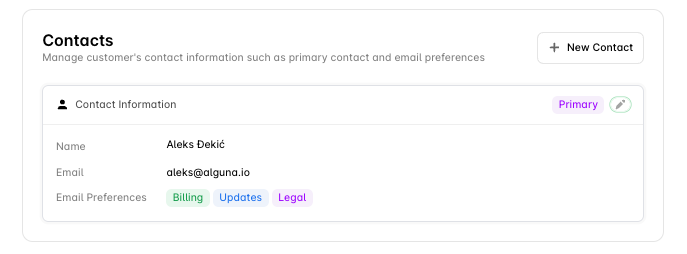
Email preferences
A contact can hold any combination, including all three. A contact with none selected receives nothing. The primary contact is the default recipient when no specific preference applies.
Contact fields
Manage contacts via the API
Contacts are part of the customer record. Send them on Create a customer or Update a customer. On update,contacts replaces the whole list: include every contact you want to keep, using its id for existing ones.
Manage contacts in the dashboard
Go to Customers → [Customer] → Contacts.- Add: click + New Contact, enter name, email and job title, select the email preferences, and Save.
- Edit: click the contact, change details or preferences, Save.
- Remove: open the contact’s three-dot menu and choose Delete Contact.
- Set primary: open the contact, toggle Primary Contact on, Save.
Common setups
Enterprise customer- Accounts payable mailbox —
billing, primary - Finance director —
billing - General counsel —
legal - CTO or IT owner —
updates
- One owner-operator with
billing,legalandupdates
Troubleshooting
A contact is not receiving invoices or quotes — check the contact has the matching preference (billing for invoices and receipts, legal for quotes), that the email address is correct, and review Settings → Logs → Emails in the dashboard for bounces.
Everything goes to one person — that contact is probably the only one with preferences set. Add the others and give each the preferences they need.
Next steps
Manage Customers
The customer record contacts belong to.
Sending Quotes
Where the legal contact’s address is used.
Invoicing customers
Where billing contacts receive invoices.
Customer Tax Rates
Tax settings on the same profile.