

status value, decide whether invoices should be approved before they go out, or set numbering, memo, and delivery defaults.
For how invoices are created, see Recurring Invoices (from subscriptions) and One-Off Invoices (ad hoc). For delivery and payment collection, see Invoicing Customers. For where invoices sit in the wider object graph, see How Alguna Works.
Invoice statuses
Thestatus field on an invoice takes one of these values. They are the same in the API, in webhooks, and in the dashboard.
Typical transitions
pending_approval exists because many finance teams want a human to sign off before an invoice reaches a customer. The approval is a dashboard action on the invoice; it is unrelated to the quote and subscription approval workflows.
Reading statuses from the API
GET /invoices filters on status (repeatable), customer_id, subscription_id, external_reference, and date ranges such as due_date_lte and paid_date_gte. See List invoices.
invoice.issued and invoice.paid webhooks fire on the two transitions most integrations care about.
Previewing an invoice before it is issued
An invoice that has not been issued yet —draft, upcoming, pending_approval, or scheduled — still renders a PDF on demand. Alguna generates it at the moment you ask, through the same renderer that produces the issued document, so the preview is what the customer will receive rather than an approximation of it. Use it to check a memo, a footer, or a line item before approving.
In the dashboard, open the invoice and choose View PDF or Download PDF from its actions. Through the API, GET /dashboard/invoices/{id}/pdf returns the same document.
A preview renders as soon as the account has a default invoice issuer set, since the issuer decides what the document looks like. Set one per account, or organization-wide under Approving and sending invoices.
Once an invoice is issued, its PDF is generated once and stored, and every later download serves that stored file. Settings you change afterward do not rewrite it.
The customer-facing email is previewed separately, under Settings → Organization → Customizations → Email templates. See Emails.
Organization settings
Invoicing defaults live in the dashboard under Settings → Workflows → Billing → Invoicing. They are organization-wide and are not exposed through the public API; per-subscription overrides for auto-issue, auto-pay, payment terms, and Autopay Timing are on the subscription’sbilling object (see Recurring Invoices).
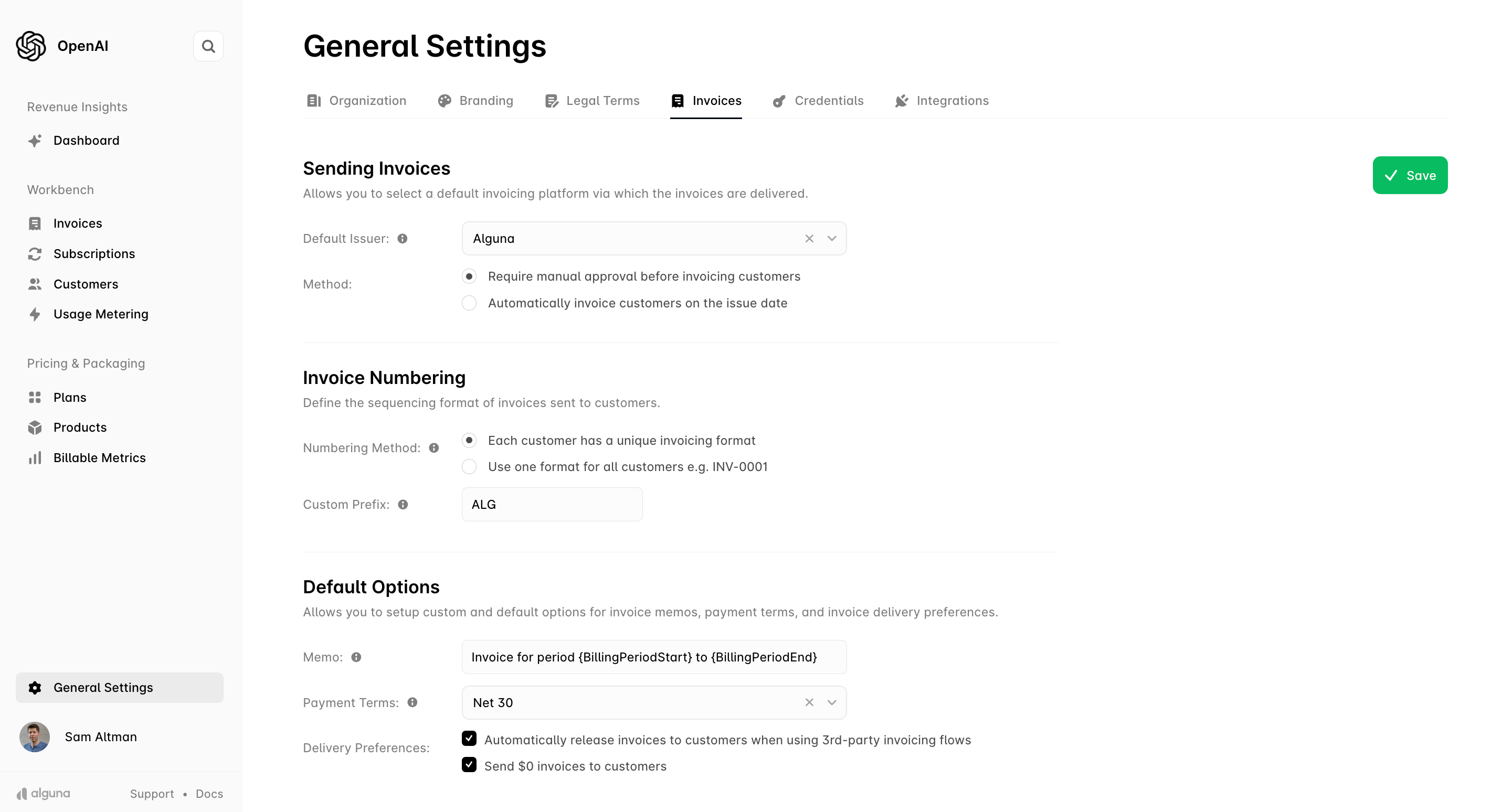
Approving and sending invoices
- Default invoice issuer: the system that issues invoices. Alguna issues and delivers them itself, or hands them to a connected invoicing integration — Stripe Invoicing, QuickBooks, or Xero. See the integrations marketplace.
-
Automatic approval: when on, an invoice moves from
upcomingstraight toscheduledwhen its period closes, and is issued on its issue date without review. Use this when usage is metered continuously and the numbers need no human check. -
Manual approval: when off, closed-period invoices stop at
pending_approval. Approve them from the invoice page with Approve Invoice, or in bulk from the invoices list. Use this when you upload usage by CSV or want a review step before anything reaches a customer.
Invoice numbering
- Numbering method: one sequence for the whole organization (
INV-0001,INV-0002, …) or a separate sequence per customer. - Custom prefix: the text before the number, for example
INV.
external_reference in the API — the customer-facing reference.
Default options
- Memo: the default text for the invoice memo. Supported variables:
{BillingPeriodStart}— first day of the billed period, e.g.August 1, 2026.{BillingPeriodEnd}— last day of the billed period, e.g.August 31, 2026.{BillingPeriod}— both ends in one variable, e.g.August 1, 2026 – August 31, 2026. A single-day period renders as that date.{CustomerName}— the customer being billed. On a roll-up invoice this is the parent.- Any other text, including placeholders in other spellings such as
{{billing_period}}, is printed exactly as written.
- Payment terms: how long after the issue date payment is due. Values are
on_issue,net_7,net_15,net_21,net_30,net_45,net_60,net_75,net_90,net_120, orindefinite(no due date, so the invoice never becomes overdue). The due date is computed when the invoice is issued. - Autopay Timing: when AutoPay charges the invoices of a new customer. When the invoice is issued (
on_issue, the default) or On the due date (on_due_date). A new customer copies this value when it is created; existing customers keep their own value. To change existing customers, select them in the Customers list and use Change defaults. Applies only to invoices that Alguna issues. See AutoPay charge timing. - Automatically release invoices to customers when using 3rd-party invoicing flows: when issuing through an external invoicing integration, send the invoice on without a second confirmation.
- Send $0 invoices to customers: deliver invoices whose total is zero. Off by default.
Next steps
Recurring Invoices
How subscriptions generate invoices and how to review them.
One-Off Invoices
Create and issue ad hoc invoices through the API.
Invoicing Customers
Delivery, AutoPay, payment methods, and the customer portal.
Collections
What happens when an invoice goes overdue.