

Create a customer via the API
Create a customer (POST /customers) needs a name and a currency; everything else is optional. Set aliases to the IDs your own systems use for this customer, so you can address them by those IDs later without storing Alguna’s.
billing_address.country is an ISO 3166-1 alpha-3 code (USA, DEU, GBR). currency is ISO 4217.
Addressing a customer by your own ID
Wherever an endpoint takes a customer{id}, it also accepts an alias or a connected-account external ID (for example a Stripe customer ID). To resolve one to the Alguna ID without fetching the whole record, use Look up a customer ID by alias (GET /customers/lookup?alias=...).
Create or look up?
There is no upsert endpoint:POST /customers always creates, and calling it twice for the same buyer gives you two customers with split subscriptions, usage and invoices. When your signup flow cannot be sure whether the customer already exists, look up first and create only on a miss:
GET /customers/lookup?alias=<your ID>— a200returns the Alguna ID and you are done.- On
404,POST /customerswith that same ID inaliases. - Send an
Idempotency-Keyon the create, derived from your own ID (for exampleik_customer_<your ID>), so a retry after a timeout replays the first response instead of creating a second customer.
Update
Update a customer (PATCH /customers/{id}) patches only the fields you send. Sending contacts or aliases replaces the whole list, so include the existing entries you want to keep. Set or remove the parent customer with parent_customer_id and clear_parent_customer_id. Tax settings and legal entity are set in the dashboard; the API returns tax fields read-only on the customer.
Connected accounts
If the customer also exists in a connected system (Stripe, HubSpot, an accounting integration), record the link with Link a connected account to a customer (POST /customers/{id}/connected-accounts, with integration_id and external_id). This records the mapping only; it creates nothing in the external system and triggers no sync.
Create a customer in the dashboard
In Customers, click New Customer.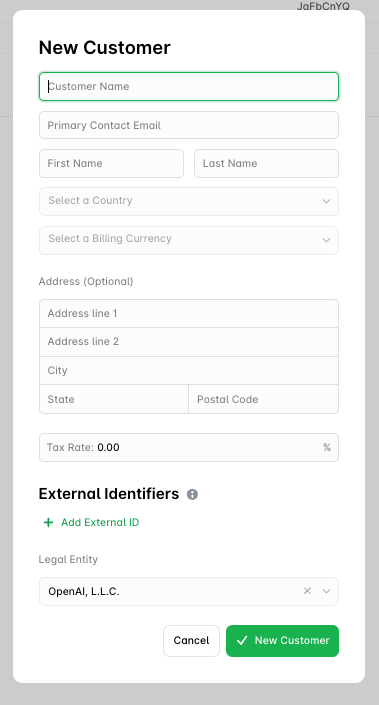
- Customer name: the company or person you are billing.
- Primary contact email, first name and last name: the contact that receives correspondence by default.
- Country and billing currency (ISO 4217).
- Address (optional): line 1, line 2, city, state, postal code.
Editing a customer
The Customer Profile page groups the customer’s settings: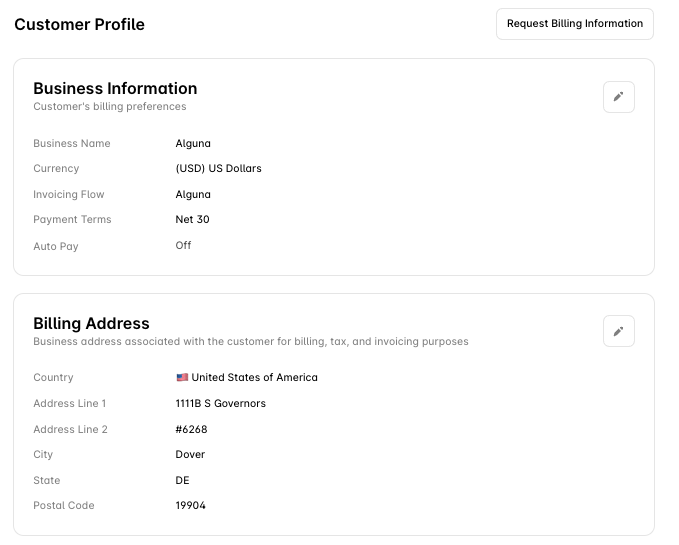
Legal entities and merchants
Two different things sit above a customer, and they are easy to confuse:- A legal entity is one of your selling entities: the registered business that issues the invoice, holds the tax registration and owns the receivable. Configure them on the Legal entities settings page, which is not in the settings menu. Open it directly: Production or Sandbox. Each legal entity has its own tax rules and FX rates. Every customer is assigned to one legal entity, and that entity appears as the From party on the customer’s invoices. Revenue and tax reporting are available per legal entity (
GET /revenue-schedules/legal-entity/{id}). See Alguna Tax and Multi-currency. - A merchant is a business you sell on behalf of. Invoices and receipts issued for a merchant carry its name and logo, while your legal entity stays the seller of record and keeps the contract, the payment and the tax liability. Merchants are display identity only and are managed through the Merchants API (
POST /merchantswith adisplay_nameand yourexternal_id, optional logo and support email).
Next steps
Customer Contacts
Route invoices, quotes and updates to the right people.
Customer Tax Rates
Tax ID, rate and treatment per customer.
Customer Families
Parent and child customers for roll-up billing.
Create your first subscription
Put the customer on a plan.